Diabetes Recorder
Was developed in order to reduce the burden of (SMBG) for blood glucose self-measurement.
The recorded data can be output to so PDF, is available as sharing information with doctors and family to print.
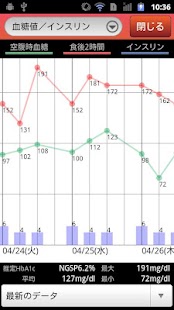
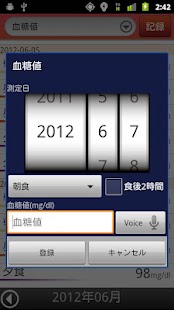
PDF is to work with other apps and services, storage services and save to PC, print out the copy machine is available in convenience stores and PC.■ The main functionRecording function and blood glucose, HbA1c, body weight, body fat, pulse, blood pressure, insulin / GLP-1Alarm function measurementCreation and PDF, transfer functionGraph display function
■ cooperation print services that can beWe have tested the following services, in the app.
· Seven-Eleven Net PrintCircle K Sunkus network print· BROTHER iPrint & Scan
■ other services cooperationCooperation has been confirmed in the following services.· PDF to save DROPBOX· PDF to save EVERNOTESave to Yahoo!
box-PDFStore and Google docs to PDFTransfer and mail in GMail
■ target terminalAndroid2.1 or moreMicrosoft has confirmed that the terminal operates in the following.e-mobile S31HT HTC ARIA (Android2.2)docomo SO-02C SonyEricsson XPERIA Acro (Android2.3)docomo N-04C NEC MEDIAS (Android2.3)docomo SO-01B SonyEricsson XPERIA (Android2.1 update1)docomo SC-04D Samsung GALAXY NEXUS (Android4.0)docomo SH-03C SHARP LYNX 3D (Android2.2)
■ The difference between free version and paid versionAds will be displayed on the screen.The free version of the data retention period is three months.In the paid version so that you can change as a response model, via the SD card, move to another terminal on the data, corresponding to the export and import to the SD card.The free version as a transition to the paid version, only supports export of data.The free version is fixing the past 30 days, in the paid version can be confirmed also specify the past month from that day to other graph display period of the function.
■ information such as the reference value has been used in the applicationAs of May 2012, we set the value based on the information of the Japan Diabetes Society.
About Diabetes Recorder
- Package name (App ID)
- org.bowapp.android.diabeteslog
- Available on
- Google Play
- Price
- Free
- Version
- v1.5.5
Looking for the Diabetes Recorder APK?
The safest way to get Diabetes Recorder (org.bowapp.android.diabeteslog) on your Android device is to install it directly from Google Play — you'll always get the latest official version, automatic updates, and no risk of modified or infected APK files from third-party sites.
Social Features
Connect and share with friends and the community.
Gaming Features
Enjoy immersive gaming experience with various game modes.
Learning Tools
Enhance your learning experience with interactive features.
See Diabetes Recorder in Action
Frequently Asked Questions
Is Diabetes Recorder free?
Yes, Diabetes Recorder is free to download and install on Android through Google Play.
How do I install Diabetes Recorder on Android?
Open Google Play on your Android phone or tablet, search for Diabetes Recorder or tap the Google Play button on this page, then tap Install. The app downloads and installs automatically.
What is org.bowapp.android.diabeteslog?
org.bowapp.android.diabeteslog is the App ID (package name) of Diabetes Recorder on Google Play. Every Android app has a unique package name, and it is the safest way to verify you are installing the official app.
Is Diabetes Recorder safe to download?
Installing Diabetes Recorder from Google Play is the safest option: you get the official version, verified by Google Play Protect, with automatic updates. Avoid APK files from unofficial third-party sites.
Get Diabetes Recorder Today
Diabetes Recorder for Android — free download on Google Play.
Compatible with Android phones and tablets — available on Google Play.
Ask AI about this app
Get instant answers about features, tips and more from popular AI assistants.